|
This is your source for the technology behind Logitech's
innovative and world-class products.
Read about MX Optical Technology
Read about Fast RF Cordless Technology
Introduction
The Optical Advantage
How an Optical Mouse Works
Advantages of the MX Optical Engine
Performance Specifications
Conclusion
Logitech
helped pioneer the mouse industry over 20 years ago with the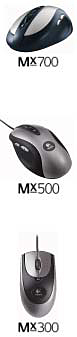
introduction of its first mouse in 1981. This mouse was ahead
of its time,
and it wasn’t until graphical user interfaces became
popular a few years later
that mice became an essential computing tool.
For
the next 18 years the basic operating principles of mice
remained the
same. Nearly every mouse tracked motion using the familiar
ball-based
mechanical tracking system. It wasn’t until a few
years ago that a whole new
breed of mouse started to appear, the optical mouse.
Logitech’s
optical experience began in 1995 when it introduced its
proprietary Marble™ optical sensing technology for
trackballs. Then, in
2000, Logitech introduced a mouse featuring an optical tracking
system,
replacing the ubiquitous ball with a tiny digital camera
and image
processing system. This new technology revolutionized the
way mice work
and eliminated many of the problems associated with ball-based
mice.
Despite
the advantages of the new optical mice, there were some
limitations. Most notably, they didn’t track well
on certain surfaces, and
they had trouble following quick motions.
To overcome
these limitations, Logitech worked with partner Agilent
Technologies to develop an entirely new optical system,
the MX™
Optical Engine. The first mice to feature the MX Optical
Engine are Logitech’s
new MX™ Series of performance mice. These mice provide
smooth, precise
tracking on previously difficult surfaces, and respond to
even the fastest
hand movements.
This
paper explains the factors that contribute to optical performance,
and
the advantages of the new MX Optical Engine.
return
to top
By their
nature, traditional ball-based mice inherently suffer from
a couple
of problems. First, as the ball rolls along a surface, it
picks up dust or other
contaminants that eventually build-up and affect tracking.
Typically this
results in choppy cursor movement, making it difficult to
accurately point.
Second,
ball-based mice don’t work well unless they are used
on a mouse
pad. The pad provides a flat surface so the ball can maintain
good traction
and roll smoothly. Otherwise cursor movement will not be
fluid and the
mouse will have to be moved farther than necessary to reach
a point on the
screen.
Optical
mice overcome these problems because they track motion without
the use of moving parts that can become dirty or wear out.
Furthermore,
because the optical tracking system doesn’t make physical
contact with the
surface, optical mice can be used on a variety of surfaces
without a mouse
pad. You can use one on a stack of paper or magazines, or
even on surfaces
that aren’t flat.
While
optical technology has many advantages, not all optical
mice are
created equal. Optical tracking systems are complex designs
consisting of
advanced opto-electronic components along with sophisticated
software
algorithms. The new MX Optical Engine features improvements
to nearly
every aspect of the optical system, outperforming previous
designs. To
understand its benefits, it helps to understand how an optical
mouse works.
return
to top
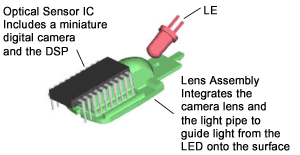
Optical
mice use an LED to illuminate the surface beneath the mouse,
a
lens to focus an image of the surface on the sensor of a
tiny digital camera,
and a specialized digital signal processor (DSP) with intelligent
software
algorithms to analyze the images.
Motion
is tracked by taking a continuous series of pictures of
the surface
under the mouse. These pictures are taken very quickly so
there are
overlapping areas between successive images. The images
are fed to the
DSP, which analyzes small surface details to see how their
relative position
changes from one picture to the next. From this analysis
the direction and
amplitude of movement are determined.
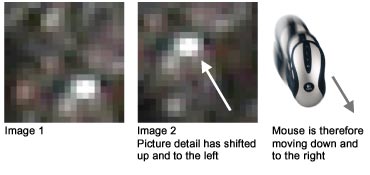
For
example, the pictures below simulate two successive images
captured by
the digital camera within an optical mouse. Details in image
1 are
compared with image 2, and from the difference in position
the DSP
determines the mouse is moving down and to the right.
return
to top
As mentioned
earlier, optical sensors are complex systems and overall
performance is a combination of many factors. Because of
this, nearly every
aspect of the MX Optical Engine was enhanced to set a new
benchmark in
performance. Following are some of the key features and
improvements.
One of the most important metrics of tracking performance
is to measure
the amount of image data the optical sensor is capable of
processing every
second. This number, Image Processing Power, is
measured in megapixels per
second and is a combination of several other metrics.
Image
processing power is important because the more image data
is
captured and analyzed each second, the more data is available
to determine
motion. This increases a mouse’s ability to track
on difficult surfaces or
during quick movements.
Logitech’s
MX Optical Engine has an image processing power of 4.7
megapixels per second, over 60% higher than other leading
mice. This
number attests to the significantly improved tracking capabilities
of the MX
Series.
An optical mouse needs to “see” small surface
details to track motion, so it
follows that the more detail captured within each image,
the more data will
be available for calculating movement.
The
MX Optical Engine captures images that are over 80% larger
than
those from other sensors on the market today. This contributes
to the
smooth, fluid tracking on traditionally difficult surfaces,
such as wood
desktops or other surfaces with repetitive patterns.
Frame rate is another important factor of tracking quality.
If the mouse is
moved too quickly and successive images don’t overlap,
then the DSP will
not be able to determine actual motion and the cursor will
move in a
random direction.
What
should the frame rate be? The answer depends. Frame rate
is
analogous to rpm in car engines, where a small engine needs
to run at a
much higher rpm than a big engine to produce the same horsepower.
Therefore
frame rates can’t be compared between optical sensors
because
there are many differences between sensors. Large images
captured by a big
sensor reduce the likelihood that successive images won’t
overlap, so just
like a big engine, a big sensor can offer excellent performance
with a lower
frame rate. Other factors can have a major effect on the
minimum frame
rate, including the quality of the optics and illumination,
the computational
power of the DSP, and the sophistication of the software
algorithms used to
analyze images.
The
MX Optical Engine combines improvements in all these areas
with a
significantly increased frame rate for accurate, responsive
control under
nearly any circumstance. It’s safe to say that few
people will ever move a
mouse faster than the MX Optical Engine can track.
The increasing popularity of large 17 and 19-inch monitors
has created a
problem for mouse users. The large screen settings used
with these
monitors mean the mouse must be moved farther than normal
to point at
something across the screen. The problem is, large movements
can be
physically uncomfortable.
Most
optical mice have a resolution of 400 DPI (Dots Per Inch),
meaning
that without software compensation, the cursor will move
400 pixels across
the screen for every inch the mouse is moved on the desktop.
For small
screen settings this is fine, but for large settings it
means the mouse must be
moved abnormally far.
To compensate
for this, mouse software drivers include speed and
acceleration controls (accessed in the mouse properties
dialog) to amplify
how far the cursor moves in response to how fast the mouse
is moved.
For
example, these controls could be set so when the mouse is
moved slowly
across the table for one inch, the cursor will move 400
pixels across the
screen. As the mouse is moved faster, cursor movement will
be increasingly
magnified up to the point where it will travel 800 pixels
or more per inch of
mouse movement.
The
problem with this is, as the settings are increased, pointing
accuracy is
decreased and the cursor becomes more difficult to control.
In the example
above, when the mouse is moved quickly for one inch, the
cursor effectively
skips every other pixel in order to travel a screen distance
of 800 pixels.
Thus pointing accuracy is reduced.
Logitech’s
MX Optical Engine resolution is 800 DPI, twice that of most
competitor’s optical sensors. This allows smoother,
more accurate cursor
control with large screens while minimizing the amount of
left-and-right
hand motion. By default, the cursor is also easy to control
with smaller
screen sizes, and Logitech’s software enables users
to adjust the
responsiveness of the cursor to suit their individual preferences.
Another
fundamental factor that determines how well an optical mouse
performs is the quality of the images it captures. Since
the lens is just a
fraction of an inch above the tracking surface, and the
actual size of the
images is very small, even slight variations in manufacturing
tolerances can
result in blurry images which seriously degrade tracking
quality.
Logitech
designed a proprietary new lens for the MX Optical Engine
that
improves the depth of field. The result: more details are
captured in each
image with greater clarity.
Significant
improvements have also been made to the illumination pattern
of the LED. Just like a standard film camera, proper lighting
makes a big
difference in how well the pictures turn out. For optical
mice, the goal is to
generate maximum contrast between small surface details.
This
is especially important on dark surfaces, which are challenging
because
less light reflects off the surface into the sensor. Bright,
even lighting is
important to keep the exposure time short. If the exposure
time is too long,
the images will be blurry when the mouse is moved very quickly,
reducing
tracking ability.
Logitech’s
improved light pipe design ensures bright, even lighting
across a
wide area for maximum efficiency and contrast. It also reduces
the amount
of power needed, extending battery life for cordless devices.
Software
Intelligence
Optical sensors incorporate software algorithms to analyze
the incoming
images and determine motion. The intelligence of the algorithms
has a
large effect on performance, especially when the mouse is
used on difficult
surfaces or pushed to its limits.
The
proprietary algorithms used in the MX Optical Engine incorporate
years of extensive research and testing, and contribute
to the outstanding
performance on surfaces that traditionally pose problems
for other optical
mice.
return
to top
 There
are a few common specifications used to indicate mouse There
are a few common specifications used to indicate mouse
performance. As with cars and stereo speakers, numbers don’t
always tell
the whole story, but they can provide a good indication of
how well a
mouse will perform.
Mouse
movements are characterized by short bursts of rapid acceleration
and deceleration as the user points to different locations
on the screen.
This is especially true while playing games, when the mouse
tends to be
moved very quickly.
Thus
maximum acceleration and speed figures are frequently used
as a
measure of performance. The MX Optical Engine is capable
of tracking
movements up to an acceleration of 10g, and a maximum speed
of 40
inches per second.
These
numbers exceed typical human limits, and are a result of
the MX
Optical Engine’s large sensor and high frame rate,
the same features that are
responsible for superior tracking on difficult surfaces.
While few will
approach the acceleration and speed limits, everyone can
appreciate the
tangible benefit of improved tracking on almost any surface.
For most people, the ability to use an optical mouse on
a variety of surfaces
is the most relevant aspect of performance. Older optical
mice had trouble
navigating surfaces with repetitive patterns, such as wood
desktops and half-tone
print.
Some
surfaces have limitations that can’t be overcome with
any optical
sensor. These include glossy and glass surfaces that are
completely smooth
and lack surface details for the mouse to analyze. Mirrors
are also
problematic, because too much light reflects off the surface
and blinds the
optical sensor.
Aside
from extremely smooth glossy or glass surfaces, the MX Optical
Engine is capable of navigating a much broader range of
surfaces than
previous generations of optical mice. The benefit to the
user is they can use
the MX Series of mice on almost any surface, giving them
the freedom to
work where they want..
Older optical mice tended to exhibit erratic cursor behavior
when moved
faster than they were capable of tracking. The cursor would
move in a
random direction across the screen, if it moved at all.
Graceful
Degradation refers to the manner in which cursor control
degrades
as a mouse’s tracking limits are surpassed. Ideally,
cursor behavior should
degrade in a predictable fashion so some degree of control
is maintained.
The ability to do so is largely a result of the intelligence
of the software
algorithms within the optical sensor’s DSP.
The
outstanding tracking capability of the MX Optical Engine
virtually
eliminates the possibility that its tracking limits will
be exceeded. Despite
this, Logitech’s advanced 3rd generation
algorithms are used within the MX
Optical Engine to ensure optimal tracking even at the outer
limits of
performance.
return
to top
While
not everyone needs the performance provided by the new MX
Optical Engine, it has been designed with the simple goal
of providing the
best possible tracking under all conditions. Any user, whether
a serious
gamer or someone who uses their mouse on a variety of surfaces,
can
recognize the advantages it offers over other optical sensors.
Simply
put, Logitech’s MX Series of mice provide more accuracy
and
control on more surfaces than ever before.
return
to top

Introduction
In a Nutshell
The Reporting Advantage
Speeding Data Transmission
Delays Eliminated
Rechargeable Power
Conclusion
Logitech
pioneered the mouse industry more than 20 years ago with
the
introduction
of its first mouse in 1981. This mouse was ahead of its
time,
and it wasn’t until graphical user interfaces became
popular a few years
later that the mouse became an essential computing tool.
That
happened in 1984, when Apple introduced its first Macintosh
computer, featuring a mouse designed by Logitech. This mouse
connected to the computer with a cable and used a rolling
rubber-coated
metal ball tracking mechanism.
Though
they worked well, corded, ball-based mechanical mice suffered
from two intrinsic shortcomings: those annoying cords always
seemed to
get in the way, and the tracking ball got gummed up with
dirt and
required frequent cleaning.
Setting
out to conquer both problems, Logitech crafted two battle
plans.
In 1992, the company shipped MouseMan® Cordless, the
world’s first
cordless mouse. Three years later, they introduced the first
optical
tracking technology with the launch of Marble™ technology
for trackballs.
Then, in 2001, Logitech achieved the best of both worlds
with the
introduction of Cordless MouseMan Optical.
The
benefits of “no ball, no cord” proved to be
substantial. Cordless mice
‘untether’ computer users, enhancing usability
while freeing valuable
desktop real estate. Optical mice offer greater precision
and smother
cursor movement, and because there is no ball, no cleaning
is necessary.
Now, in 2002, Logitech introduces the MX™700 Cordless
Optical Mouse.
Featuring advancements in both optical tracking and digital
radio cordless
technology, the MX700 delivers smooth, precise tracking,
responding
accurately to the fastest – or slightest – hand
movements. A new
benchmark in performance is established.
This
paper discusses three factors that contribute to cordless
performance
and confirm the technological superiority of Logitech’s
new Fast RF
cordless technology. These are reports per second, data-transmission
speed and method, and delay between reports.
return
to Fast RF Cordless Technology
 |
 |
For
those who don’t care about technology, the lesson
of the MX700 Cordless Optical Mouse is simple: Cordless
mice are better and the MX700 with Fast RF is Logitech's
best cordless mouse ever.
The
advantages are obvious. Cordless mice are easier to use.
They don’t get tangled. They’re not limited
to one spot on the desktop. Put a book in your lap and you
can use the mouse there. Desktop clutter is cleared from
messy cables. And cordless mice just look better.
Add
to that new optical technology that further improves accuracy
and responsiveness, and rechargeable batteries, and the
urge to get a new mouse becomes irresistible.
return
to Fast RF Cordless Technology
The
job of any mouse is simple: track movement and report it
to the
computer. The computer processes that information to move
the cursor
image on the screen. Crucial to success is how many times
per second the
mouse provides this location report. As the number of reports
per second
increases, the motion of the cursor on the screen becomes
more fluid.
Reports per second is the principal differentiating factor
between the
MX700 with Fast RF and mice from other manufacturers.
A good
analogy for reports per second is to imagine a circle, defined
as a
series of points connected by straight lines. Think of each
point as a
report, saying, “I’m here.” With just
four points, that circle would be
drawn as a square; with eight points, an octagon—closer
to a circle. With
1,000 points, individual lines become virtually invisible.
Clearly, as the
number of points increases, the shape of the circle becomes
smoother.
Likewise, as the number of reports per second increases,
the motion of
the cursor more accurately follows the movement of the mouse.

The
single most significant feature of Fast RF cordless technology
is the
ability to deliver 125 reports per second, an astonishing
2.5 times
improvement over existing cordless mouse technology. This
increase in
the report rate through Fast RF delivers “a corded
performance without
the cord.”
Why
not more than 125 reports per second? Certainly such a mouse
can
be built. The limiting factor isn’t the mouse, but
rather, the computer
port that polls the data. For example, the universal serial
bus (USB) ports
present in every modern computer are not capable of polling
faster than
125 reports per second.
return
to Fast RF Cordless Technology
Every
cordless mouse consists of two hardware components: the
mouse
itself, which contains a battery-powered transmitter, and
the receiver,
which plugs into the mouse port on the computer. Two methods
exist for
data transmission, infrared (IR) and radio frequency (RF).
Each has pros
and cons.
A television’s
remote control unit employs IR technology. IR takes
advantage of the clear line of sight between transmitter
and receiver, and
works well at distances of up to 40 feet.
Logitech’s
cordless mice opt instead for digital RF technology. Doing
so
eliminates the line-of-sight requirement, allowing the receiver
to be
placed in a convenient, yet unobtrusive location, perhaps
tucked behind a
monitor. And since the mouse and receiver are never more
than about 20
inches apart, a low-cost, low-power, short-range signal
can be used,
extending battery life significantly.
Of course,
with Fast RF and the huge leap in reports per second, Logitech
had to find a way to transmit so much additional data without
allowing
delays or backlogs to occur. This was accomplished by increasing
the
speed of data transmission. Matching the advancements in
report rate,
the bit rate for Fast RF was advanced 2.5 times over previous
RF designs.
This faster data-transmission capability would mean nothing
if there were
not more data to transmit. It is the mouse’s greatly
increased number of
reports per second that was the driving feature in developing
Fast RF.
return
to Fast RF Cordless Technology
The
third factor in achieving superior cordless mouse performance
is the
time between each report transmitted by the mouse. After
each report,
the mouse must ready itself for the next report, gathering
data about its
motion, comparing it to its last position, and packaging
that data in the
correct format. Rapid preparation (or minimizing delay between
reports)
ensures a smooth data flow and maximizes reports made per
second.
With
Fast RF, Logitech has slashed delay time to less than half
that
required by other leading mice. Doing so ensures that the
mouse’s 125
reports per second are evenly spaced and sent as a series
of discrete, yet
smooth, continuous operations.
All
three technical advances, increased reports per second,
fast data-
transmission rate, and reduced preparation time, work together
as a
system to provide a superior user experience.
return
to Fast RF Cordless Technology
Logitech’s
MX700 Cordless Optical Mouse introduces another milestone—
the elimination of replacement batteries. Thanks to the
use of
rechargeable nickel metal-hydride (NiMH) batteries, users
no longer face
the expense of purchasing and inserting replacement batteries,
a
significant and environmentally unfriendly inconvenience.
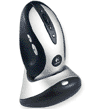
The
rapid charge base station doubles as receiver and cradle
into which
the mouse nests and recharges. A fast charging system gives
the mouse a
day’s worth of power in only 10 minutes of charging.
A full charge
provides up to 10 days worth of power – meaning that
the mouse is
always ready for work (and play).
Cost
savings can be significant. Given the price of AA-size alkaline
batteries, it is possible that, over the course of a mouse’s
use life, a user
would spend as much for batteries as for the original purchase
price of
the mouse itself.
return
to Fast RF Cordless Technology
Though
the benefits of cordless mice became clear years ago, now
it can
be said that technology has fully delivered on the vision.
The
technological leaps introduced by Logitech in the MX700
Cordless Optical
Mouse deliver a cordless experience punctuated by a silky
smoothness of
operation heretofore unknown. Combined with its sophisticated
optical-sensing
technology, feature-laden driver software, and rechargeable-battery
capability, Logitech remains a worldwide leader in input-device
innovation.
return
to top
|